I built a little web app to solve a problem that sounds trivial until you actually need it: turning a highway milepost into GPS coordinates. The code is open source, available on GitHub, and a demo is available at mapsdemo.johnsonfarms.us.
The problem
If you’ve ever had to say exactly where you are on a highway, you know mile markers and intersections are how it’s done. “Eastbound I-90, milepost 271.” Dispatchers, tow operators, and emergency responders speak in mileposts and intersections all day long.
The catch: almost no consumer mapping tool will convert that back into a latitude/longitude you can drop into a GPS or dispatching systems. Type “US-2 milepost 280” into Google Maps and you get nothing useful. The data exists, state DOTs publish it, but there’s no friendly little box to paste a milepost into and get coordinates out.
So I made one.
What it does
It’s a single map page with two ways to find a point:
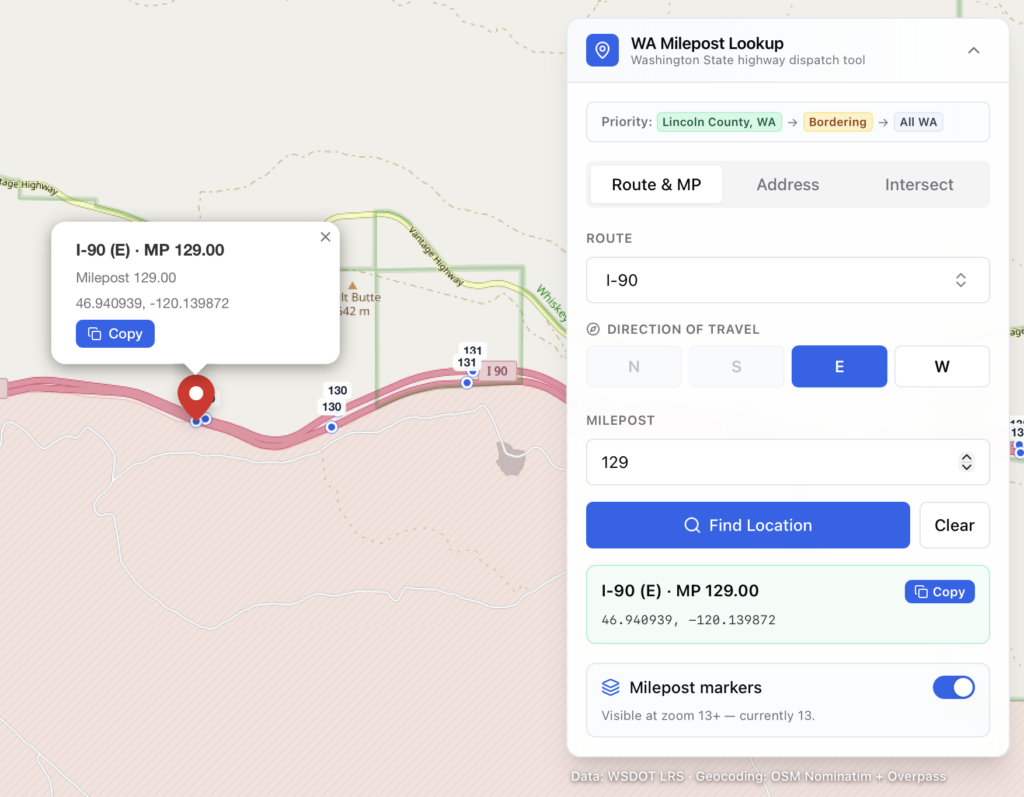
- Milepost lookup – pick a route (I-5, US-2, SR-20…), a direction, and a milepost. The map snaps to the closest marker and shows a copyable lat/long, even for fractional mileposts like 145.5.
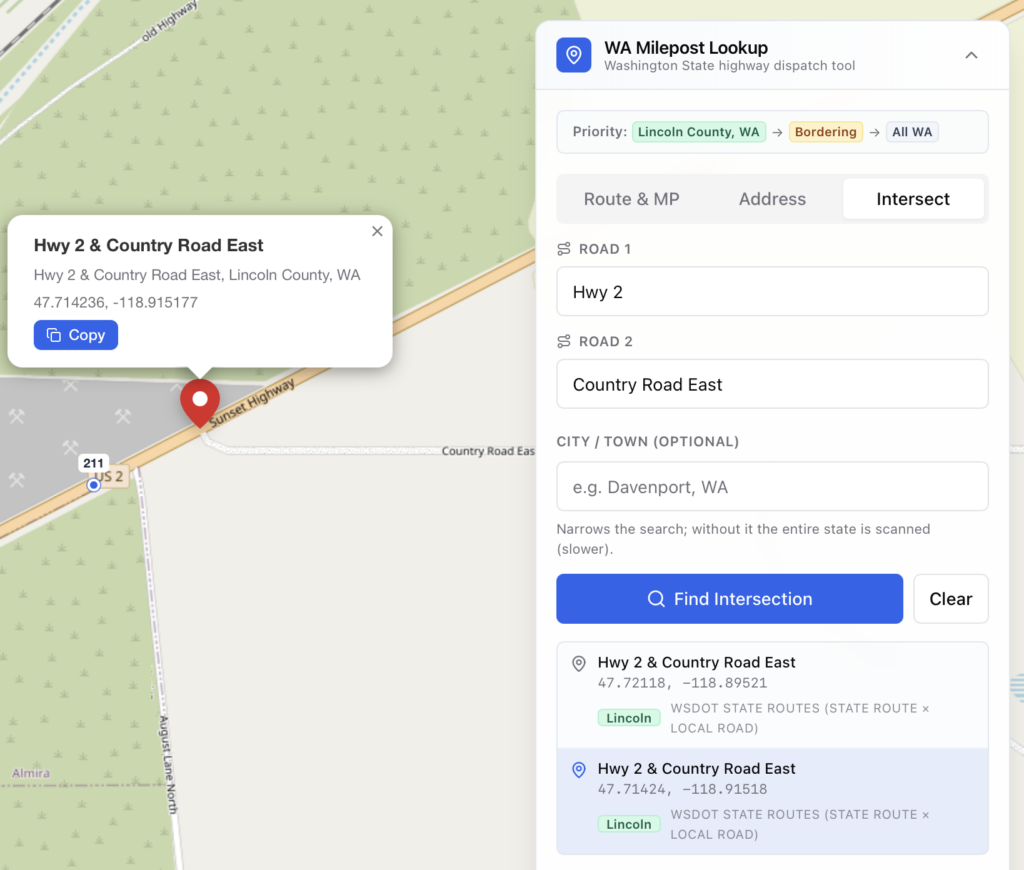
- Address & intersection search – type a normal address, or an intersection like
Maple St and Boone, Spokane, WA, and it finds the spot.
Both give you a coordinate pair you can copy straight into whatever you’re using. That’s the whole job.
The part that was actually hard
The milepost lookup is the headline feature, but the interesting work is in intersection search. Most geocoders are terrible at intersections, especially on rural and forest roads where the “address” is really just two road names crossing in the middle of nowhere.
So instead of trusting one source, the app cascades through ten of them, stopping at the first that finds the crossing. It starts with state highway data, falls back through federal land-management road layers (BLM, USGS, USFS), state forest roads, then OpenStreetMap, and finally a plain address index. Any single source can fail or time out and the search just moves on to the next one. Rural two-tracks that no single map knows about often still turn up because some layer has them.
It knows its home turf
I tuned it for our corner of Washington, Lincoln County and the counties around it, so the lookups I actually do every day land first. But that “home bias” isn’t baked into the logic; it’s just a handful of config constants.
That means anyone can re-point it at their own region. The README walks through it, but the short version is:
- Move the map to your area – edit the bounds and search window (a few constants).
- Change the “home” priority – swap in your county and its neighbors so your local results float to the top.
- Switch states – point the data seeder at your own state DOT’s milepost layer and re-seed. The federal road layers already cover the whole country, so they need no changes.
How it’s built
Nothing exotic, which is part of the point, it’s approachable if you want to poke at it:
- Next.js 14 (App Router) + TypeScript + Tailwind
- Leaflet for the map, with OpenStreetMap tiles
- Prisma + SQLite holding ~14,000 mileposts across 187 routes
- OpenStreetMap’s Nominatim and Overpass for geocoding
It needs no API keys to run. Milepost data is seeded from WSDOT’s public ArcGIS service in about thirty seconds on a fresh checkout:
cp .env.example .env
npm install
npm run db:setup   # migrate + seed (~30s, pulls from WSDOT)
npm run dev        # http://localhost:3000
It’s open source (AGPL-3.0)
The full source is on GitHub, released under the GNU Affero General Public License v3. AGPL is the copyleft license made for web apps: if you run a modified version as a hosted service, you have to share your changes too. Fork it, retarget it to your state, and keep it open.
📦 Source code: github.com/johnsonfarmsus/milepost-to-coordinates
Credits
Milepost data WSDOT (Washington State DOT). Map tiles and geocoding OpenStreetMap contributors. Additional road geometry from BLM, USGS, USFS, and Washington DNR. Thanks to all of them for keeping this data public.