I’ve been running an AI assistant called Sebastian on a self-hosted OpenClaw setup for a couple months now. He lives on a VPS, talks to my family through encrypted Matrix rooms, runs news digests, manages our recipe box, tracks wellness goals, and delegates coding tasks to Claude Code. I wrote about the full setup here.
This week I discovered something I didn’t expect: one of Sebastian’s backend models can generate 3D printable STL files directly from a text description. No Blender. No CAD software. No image-to-mesh conversion pipeline. Just “make me a tentacle, 200mm tall, 70mm wide at the base” and out comes a valid STL ready for the slicer.
How It Works
The model is GLM-5-Turbo from Z.AI (formerly Zhipu AI). It’s a 744B mixture-of-experts model that, among other things, can generate ASCII STL geometry directly as text output. STL is the standard format for 3D printing, it describes a 3D shape as a collection of triangular facets with normal vectors.
When I ask GLM-5-Turbo to “generate a model of a cylinder, 100mm tall, 10mm diameter,” the model thinks for a few seconds (it’s a reasoning model, so it plans the geometry first), then outputs raw STL text, vertices, facets, normals, that it saves as an .stl file and to open directly in Cura, PrusaSlicer, or any other slicer.
What Makes This Different
Most AI-to-3D-printing workflows in 2026 are multi-step:
- ChatGPT generates a reference image, which you then convert to a mesh through a service like Meshy AI or PrintPal
- Claude can drive Blender via MCP, but you need Blender installed locally and running as a bridge
- Gemini recently added interactive 3D previews, but export options are still limited
- Dedicated services like Meshy do native 3D generation with STL export, but they’re separate paid platforms
GLM-5-Turbo skips all of that. The model understands 3D geometry well enough to write valid STL directly. No middleware, no conversion step, no external service. Text in, printable file out.
How I Set It Up in Sebastian
I built a skill for it — OpenClaw’s native mechanism for teaching an agent a new capability. The skill fires when anyone in our Matrix rooms asks to create a 3D model, generate an STL, or design something for printing. Here’s the flow:
- User asks: “Hey Sebastian, make me a cable clip that’s 15mm wide with a 5mm channel”
- Sebastian clarifies dimensions if needed
- Sebastian calls GLM-5-Turbo via the Z.AI API with no token limit (complex models need room to generate hundreds of facets)
- Extracts the STL content from the response and saves it to the web server
- Shares a download link:
https://yourdomain/cable-clip.stl
The file is immediately downloadable. Open it in your slicer, slice it, print it. If you want changes — “make it 20mm wide instead” — Sebastian regenerates with a new version number and shares the updated link.
The Cost
This runs on Z.AI’s GLM Coding Plan Lite, $27 per quarter ($9/month). That covers the GLM-5-Turbo model for 3D generation plus access to GLM-5.1 for coding tasks, GLM-4.7 for general work, and bundled MCP tools for web search and code analysis. The 3D generation is just one capability of a model I’m already paying for.
My test cylinder used about 12,000 tokens total (7,700 on reasoning, 4,000 on the actual STL output). That’s a fraction of the Lite plan’s monthly quota. Even generating a dozen models a week wouldn’t come close to the limit.
It’s Not Just Cylinders
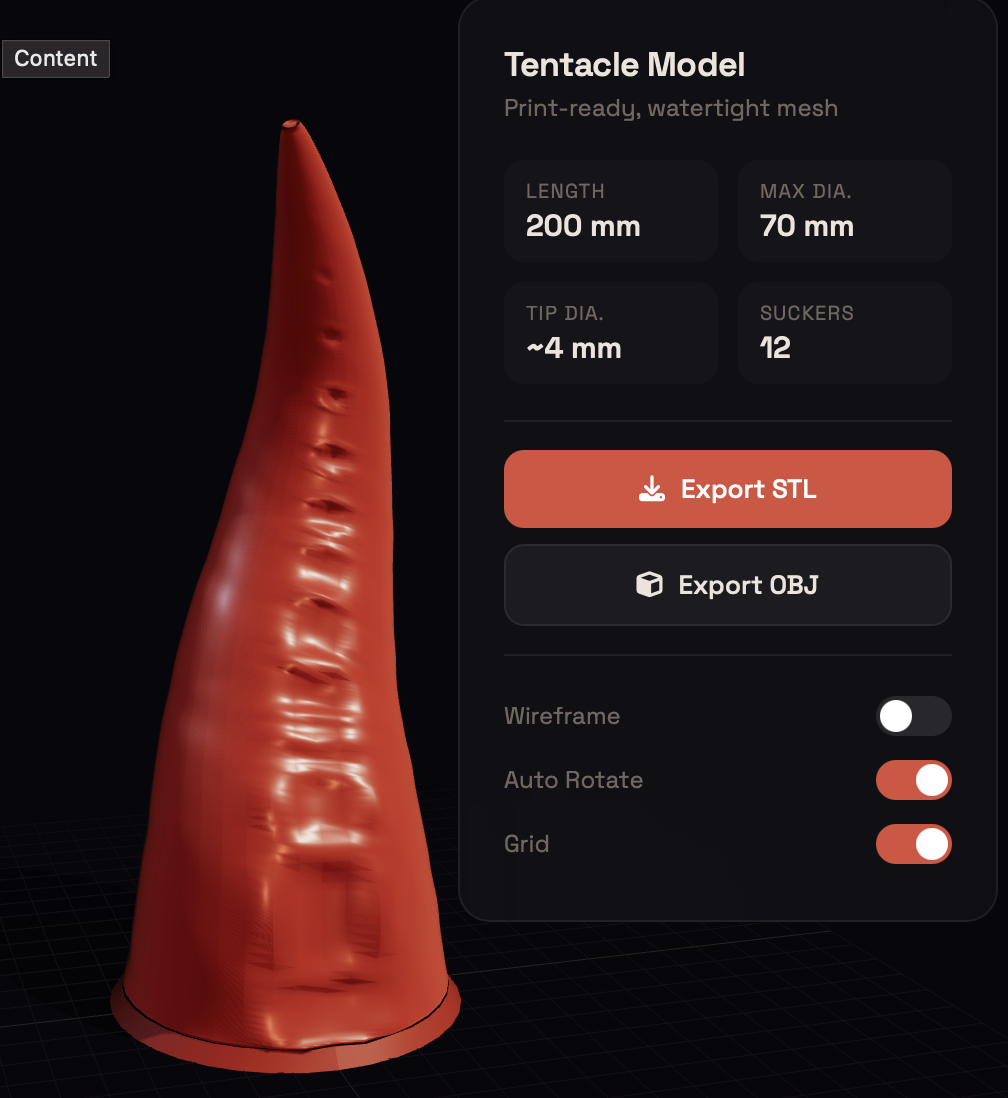
My initial test was a simple cylinder, 48 facets, 9KB, done in 12 seconds. I figured that was probably the ceiling. Then I asked for a tentacle.
GLM didn’t just spit out a flat list of triangles. It generated a full procedural model with a CatmullRom spline for the organic S-curve, 12 suction cups with concave bowls and raised rims, wrinkle noise functions for surface texture, a tapered radius from 70mm base to 4mm tip, and a print-ready flange base. The geometry was built parametrically, every dimension a variable, every curve mathematically defined. It even made an html viewer for it as well.
This isn’t pattern-matching from a library of pre-made shapes. The model is doing real computational geometry: parallel-transport frames along a 3D curve, trigonometric cross-sections with displacement mapping for the suckers, cosine-smoothed bowls with sinusoidal rim profiles. It understood that a tentacle needs to taper non-linearly, that suction cups should shrink toward the tip, and that organic surfaces need subtle noise to avoid looking CG. Is it perfect, no, but I also gave almost no direction, so for a rough first go I was impressed.
The range of what it can generate is wider than I expected:
- Mechanical parts — brackets, clips, cable channels, phone stands, mounting plates with screw holes
- Organic shapes — tentacles, horns, shells, tree-like branching structures
- Functional enclosures — cases with snap-fit lids, battery compartments, ventilation slots
- Decorative objects — vases with patterned walls, figurine bases, desk ornaments
- Parametric designs — objects defined by dimensions you specify, easily tweakable for reprinting at different sizes
Practical Limits
That said, let me be honest about what I’ve found so far:
- Dimensional accuracy depends on prompt clarity — “make it roughly phone-sized” gives approximate results. “142mm x 73mm x 8mm with 2mm wall thickness and a 12mm camera cutout at 15mm from the top edge” gives precise results. The more specific you are, the better the output.
- It’s ASCII STL, not binary — the files are larger than binary STL but every slicer reads them fine. A complex model might be 500KB+ as ASCII where the binary equivalent would be 100KB.
- Thinking overhead is real — GLM-5-Turbo is a reasoning model. My test cylinder used 7,700 tokens on thinking before producing 4,000 tokens of actual STL. Complex models take longer and use more of the subscription quota. But there’s no hard cap, the model has 128K tokens to work with.
- Iteration is the workflow — the first generation is usually close but not perfect. “Make the wall thicker” or “add a hole here” and regenerate. Each version gets its own file, so you can compare in the slicer.
What’s Next
I’m curious to push this further, functional parts with snap fits, interlocking assemblies, threaded connections. The model’s reasoning step (where it spends tokens planning the geometry before outputting it) suggests it’s doing real geometric math, not just pattern-matching from training data. Whether that holds up for engineering-grade parts remains to be tested.
For now, the fact that I can sit on the couch, message my AI assistant “make me a wall hook, 40mm wide, 30mm deep, with a 3mm screw hole,” and have a printable STL file in my downloads within 30 seconds, that’s a workflow I didn’t have yesterday.
Sebastian runs on OpenClaw 2026.4.9, communicates via Matrix/Element, and uses Z.AI’s GLM-5-Turbo for 3D model generation. The 3D skill is one of eight custom skills in his toolkit, alongside coding delegation, image generation, and a self-learning system.